Adding Physics into the Mix

Creating pretty voxel terrain (and managing it under the hood in the engine) was a good first step, but if we really want to push towards a prototype, we need to have entities roaming about the world. In order to do that, we need to have add physics – entities should be able to interact with the voxel terrain, and each other.

Adding a Physics Engine to the

There are a lot of off-the-shelf physics libraries, and there are a lot of good ones. But they are geared towards heavily detailed physics simulation (ragdoll physics, cloth physics, particle physics, etc), and make a lot of assumptions that lead to overheads. I want to a lightweight physics engine that integrates with a voxel world – and one that is simple enough to provide enough realism while not adding much overhead. The faster, the better – and the simpler, the faster.

The video above shows the work-in-progress where entities can collide with terrain, and each other. It uses the separating axis theorem as a basis for collision detection. I’m quite happy with it as a first cut, and its pretty close to what I want in the end. It’s crazy fast, which is important for what I want to do later.
3D Voxel Terrain

I’ve hit a small milestone! I’ve gotten voxel (3d pixel) terrain working in my game engine! The height maps from last post are used generate some placeholder terrain, which are then saved to chunk files (where a chunk is 32x32xHEIGHT blocks). Moving around in the 3d space creates a “viewable” radius of the world around you – as shown the viewing distance is roughly equivalent to max view distance achievable in other voxel game engines (like minecraft). 60+ frames per second on unoptimized code feels really great! I expect I can get another 10x of performance with some tweaking, but for now I’m all about *prototyping*.

One interesting technical tidbit from my work is thinking about file compression. Voxels take up a lot of space (1 byte per voxel), and building large worlds can mean lots of storage (including RAM). For example, even a 1024x1024x1024 map takes up 1GB of disk storage, and that is a very small world! But, voxels are quite similar and we can try to compress the file and save RAM and disk space. So I decided to implement some techniques and record the results.

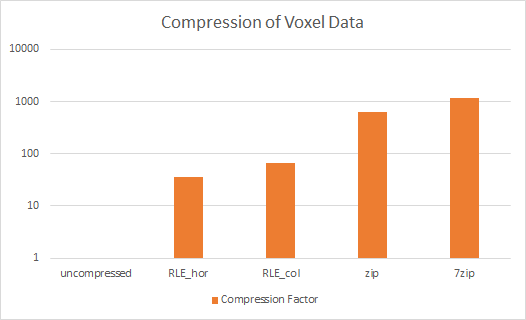
The above figure shows my results. Run-length encoding is a great technique for data that is simple and pretty similar. It basically tries to find adjacent data that are the same and combine them. For example, AAABBA = 3A2B1A. The thing is, you need to choose a direction to look for, and I tried both checking horiztonally (RLE_hor) and vertically (RLE_col) across stripes in each chunk. Then, taking those results I compressed using LZX compression as found in zip/7zip. The results are pretty amazing. It turns out that on real terrain (with a variety of block types), RLE in the vertical direction is best, giving close to 65x compression (1GB/1024MB to ~16MB in our example). Adding LZ compression pushes you to around 600x to 1200x compression (1GB/1024MB to <1MB in our example). The entire world now fits in less than a megabyte! One of the side effects of compression besides saving space is also improving load speeds. RLE encoding in particular is extremely fast, which means that chunks can be loaded quickly.

That’s my update! I’ve got a lot of things I’m currently working on and hope to share soon!

Building a Good Looking Map

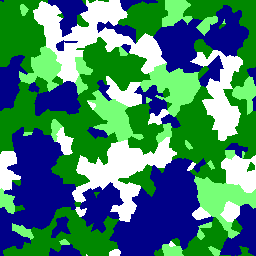
Example map generated by my tool.

Having a quality map to play a role-playing game on is very important. Quality is relative, but usually we expect some oceans/lakes, some mountains, and terrain in between. It’s hard to get it balanced right, let alone randomly generate those features. In my experience, noise functions like Perlin noise don’t do a good enough job alone to generate terrain – you need to put more into into it.

In the picture above, you can see my take at generating a 2D map (which then needs to be turned into a 3D map later). I iterated by randomly generating “biomes” such as water (blue), grass (green), and mountains (white). You can see the results look pretty good, with good distributions of each. There are both large and small bodies of water, and a good distribution of land types.

I’m happy with it so far – there’s a lot more I’d like to do but I’m in prototyping mode.

project = new Project(“Game”)

Starting on this new project! I’ve had an idea for a role-playing game running through my head for a long time (years), and now is the time to start on it.

I want to prototype the game and get it off the ground and see where it will go. If it’s not a fun game to play, I don’t want to work on it. So, I’ve got my code base up (nice to start with everything clean), and some colored cubes displaying in OpenGL (drawn with shaders). I expect a simple art style, but I don’t want to code a game engine completely from scratch either.

The purpose of this blog is to keep track of my progress and chronicle the milestones. Should be a fun and challenging experience – can’t wait for the project to take off!